Recent

Comments

Follow us on Facebook

Sunday, 12 November 2017

Forth * pattern in C++

- No comments

Forth * pattern in C++

Print Star Triangle

#include<iostream.h>
#include<conio.h>
using namespace std;
 main()
{
int i, j, k;
for(i=5;i>=1;i--)
{
for(j=1;j<i;j++)
{
cout<<" ";
}
for(k=5;k>=i;k--)
{
cout<<"*";
}
cout<<"\n";
}
getch();
}

Output

        *
      * *
    * * *
  * * * *
* * * * *

* pattern output using C++ second

- No comments

* pattern output using C++ second 

Print Star Triangle

#include<iostream.h>
#include<conio.h>
using namespace std;
 main()
{
int i, j, k;
for(i=5;i>=1;i--)
{
for(j=1;j<i;j++)
{
cout<<" ";
}
for(k=5;k>=i;k--)
{
cout<<"*";
}
cout<<"\n";
}
getch();
}

Output

        *
      * *
    * * *
  * * * *
* * * * *

output Star Triangle in c++

- No comments

output Star Triangle in c++

#include<iostream.h>
#include<conio.h>
using namespace std;
 main()
{
 int i, j;
 for(i=5;i>=1;i--)
{
for(j=1;j<=i;j++)
{
cout<<"*";
}
cout<<"\n";
}
getch();
}

Output

* * * * *
* * * *
* * *
* *
*

* Pattern in C++

- No comments

* Pattern in C++

Print Star Triangle

#include<iostream>
#include<conio.h>
using namespace std;
 main()
{
int i,j;

for(i=1; i<=6; i++)
{
for(j=1; j<i; j++)
{
cout<<"*";
}
cout<<"\n";
}
getch();
}

Output

*
* *
* * *
* * * *
 * * * * *

Output Diamond Pattern in C++

- No comments

Output  Diamond Pattern in C++

To print diamond pattern of stars in C++ programming, you have to ask from the user to enter the number of rows (upto which he/she want to print the diamond patter) for dimension of diamond. Now to print diamond pattern of stars, use six for loops. The first for loop (outer for loop which contains two for loops. One to print spaces and the second to print stars) is to print pyramid pattern of stars. The second for loop (the second outer for loop which also contains two for loops. One to print spaces and second to print stars) is used to print reverse pyramid of stars. Which wholly makes a diamond pattern of stars as shown here in the following program.

C++ Programming Code to Output Diamond Pattern

Following C++ program ask to the user to enter number of rows for diamond dimension to print the diamond pattern, then display the result on the screen:
/* C++ Program - Print Diamond Pattern */
  
#include<iostream.h>
#include<conio.h>
void main()
{
    clrscr();
    int n, c, k, space=1;
    cout<<"Enter number of rows (for diamond dimension) : ";
    cin>>n;
    space=n-1;
    for (k=1; k<=n; k++)
    {
 for(c=1; c<=space; c++)
 {
  cout<<" ";
 }
 space--;
 for(c=1; c<=(2*k-1); c++)
 {
  cout<<"*";
 }
 cout<<"\n";
    }
    space=1;
    for(k=1; k<=(n-1); k++)
    {
 for(c=1; c<=space; c++)
 {
  cout<<" ";
 }
 space++;
 for(c=1 ; c<=(2*(n-k)-1); c++)
 {
  cout<<" ";
 }
 cout<<"\n";
    }
    getch();
}
When the above C++ program is compile and executed, it will produce the following result:
C++ program print diamond pattern

Saturday, 11 November 2017

1) Press ‘ +‘ to add two numbers 2) Press ‘-‘ to subtract two numbers 3) Press ‘/’ to divide two numbers 4) Press ‘*’ to multiply two numbers

- No comments


QNo1.
*********************************************************************************
                                                                Arithmetic  Operations                                                                                
*********************************************************************************
1)      Press  ‘ +‘  to add two  numbers
2)      Press  ‘-‘  to subtract two numbers
3)      Press ‘/’  to divide two numbers
4)      Press ‘*’ to multiply two numbers

*********************************************************************************
Enter ist  Number :
Enter 2nd Number:
Select arithmetic operator from menu:
Result of Addition/Subtraction/Multiplication/Division is:

i)                    Create Menu as given above
ii)                   Take input from user for two integers

iii)                 Using switch statement, perform operation on two numbers as specified by user

Programing code

# include <iostream>
using namespace std;

int main()

{
    char op;
    float num1, num2;
    cout<<"************************************************************************************************************************ ";
    cout<<" \n                               arthematic operation                                                                        ";
    cout<<"\n************************************************************************************************************************ ";

    cout <<"                              \n1)Press + to add number                                                                      ";

    cout<<"                               \n2)press - to subtract number                                                                 ";
    cout<<"                               \n3)press * to  multiple number                                                                ";
    cout<<"                                \n 4)press / to divided number                                                                ";
    cout<<"\n************************************************************************************************************************";
    cin >> op;
    cout << "Enter firt operands       =      : ";
    cin >> num1 ;
    cout<<"Enter second operands       =      : ";
    cin>> num2;

    switch(op)

    {
        case '+':
            cout << num1+num2;
            break;

        case '-':

            cout << num1-num2;
            break;

        case '*':

            cout << num1*num2;
            break;

        case '/':

            cout << num1/num2;
            break;

        default:

            cout << "Error! operator is not correct";
            break;
    }

    return 0;

}

Syntax switch statement

- No comments
switch statement allows a variable to be tested for equality against a list of values. Each value is called a case, and the variable being switched on is checked for each case.

Syntax

The syntax for a switch statement in C++ is as follows −
switch(expression) {
   case constant-expression  :
      statement(s);
      break; //optional
   case constant-expression  :
      statement(s);
      break; //optional
  
   // you can have any number of case statements.
   default : //Optional
      statement(s);
}
The following rules apply to a switch statement −
  • The expression used in a switch statement must have an integral or enumerated type, or be of a class type in which the class has a single conversion function to an integral or enumerated type.
  • You can have any number of case statements within a switch. Each case is followed by the value to be compared to and a colon.
  • The constant-expression for a case must be the same data type as the variable in the switch, and it must be a constant or a literal.
  • When the variable being switched on is equal to a case, the statements following that case will execute until a break statement is reached.
  • When a break statement is reached, the switch terminates, and the flow of control jumps to the next line following the switch statement.
  • Not every case needs to contain a break. If no break appears, the flow of control will fall through to subsequent cases until a break is reached.
  • switch statement can have an optional default case, which must appear at the end of the switch. The default case can be used for performing a task when none of the cases is true. No break is needed in the default case.

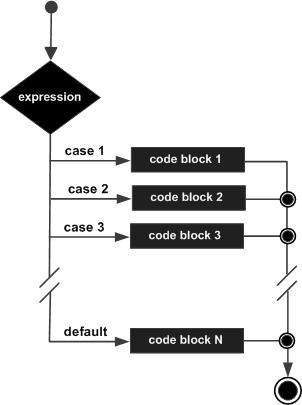
Flow Diagram

C++ switch statement

Example

#include <iostream>
using namespace std;
 
int main () {
   // local variable declaration:
   char grade = 'D';

   switch(grade) {
      case 'A' :
         cout << "Excellent!" << endl; 
         break;
      case 'B' :
      case 'C' :
         cout << "Well done" << endl;
         break;
      case 'D' :
         cout << "You passed" << endl;
         break;
      case 'F' :
         cout << "Better try again" << endl;
         break;
      default :
         cout << "Invalid grade" << endl;
   }
   cout << "Your grade is " << grade << endl;
 
   return 0;
}
This would produce the following result −
You passed
Your grade is D

Write a program, that takes 16-Elements in Two-Dimensional-Array that has 4 rows & 4 columns, then display the diagonal of Matrix.

Write a program, that takes 16-Elements in Two-Dimensional-Array that has 4 rows & 4 columns, then display the diagonal of Matrix. ...

propeller ads

PropellerAds